
UEFN Multiplayer Preview: Test the Rules Before Inviting Friends
GAME MODE Staff·Aug 28, 2026· 1m read
Simulated players can expose team and spawn problems early in an island build.
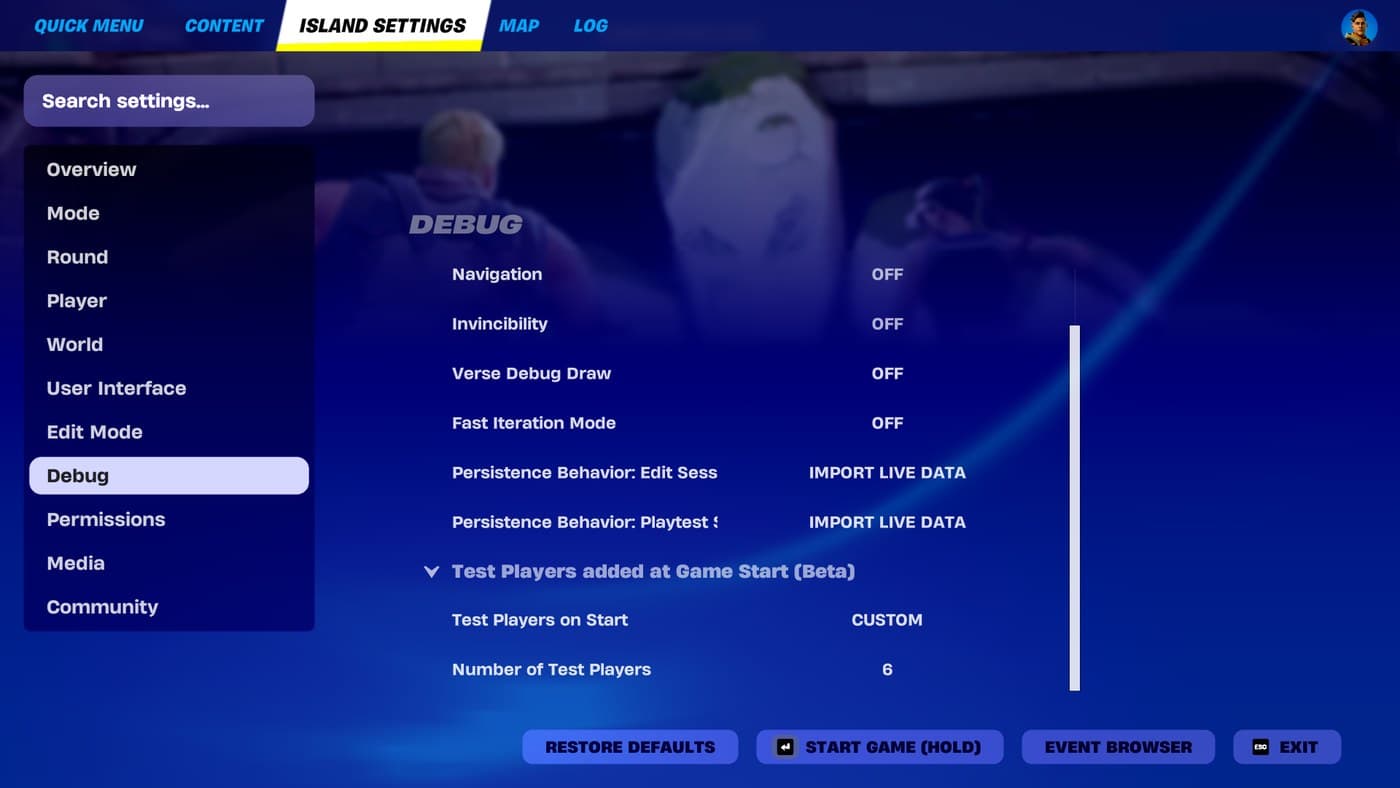
UEFN’s multiplayer preview tools can add test players to a session, with Epic documenting support for up to 98. These tools help creators inspect multiplayer behavior before assembling a full group of people. They are especially useful when a design depends on player counts, teams, or spawn assignments. (Epic Games UEFN multiplayer preview documentation)

Write the expected result first
Pick one rule to test. For example, decide which team a new player should join and where that team should appear. Then launch a preview with enough test players to expose an imbalance. A clear expected result makes a failure easier to diagnose than simply watching a busy island and hoping it looks right.
Repeat the check after changing a device or setting that affects the same rule. Small edits can have consequences outside the area where you made them.
Finish with human playtesting
Simulated players can help check systems, but they cannot establish whether a route is intuitive or a round is enjoyable. Once the basic rules work, invite people to try the island without coaching them through every step. Observe where they hesitate and what they misunderstand. Technical checks and human feedback answer different questions, and a strong island needs both.
Cited sources (1)
- Epic Games UEFN multiplayer preview documentation ↗dev.epicgames.com