Give Your Future Editor Separate Audio Tracks
GAME MODE Staff·Aug 15, 2026· 2m read
Recording your microphone, game, and chat separately can rescue a highlight that would otherwise be difficult to mix.
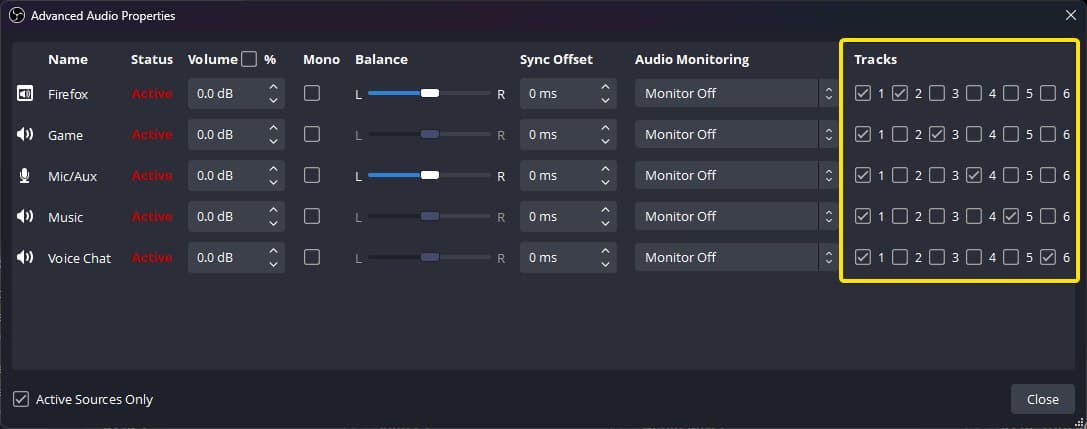
A great clip can become difficult to edit when every sound is baked into one recording track. OBS supports assigning audio sources to separate tracks, allowing an editor to adjust the microphone, game, and voice chat independently after a session. (OBS multiple audio track guide)
Keep a complete listening track
OBS points out that ordinary video players usually play one audio track at a time. Its example keeps all sources on the first track while using additional tracks for separation. That means a quick playback still sounds complete, while editing software can access the individual parts.
Sketch your routing before clicking through settings. Write down which source belongs on the combined mix and which isolated track it should also reach. Then enable the intended recording tracks in Output settings; assigning a source alone is not the whole setup.
Test the file in your editor
Record a short sample with clear moments: speak alone, play game audio alone, and ask a friend to speak in chat. Open the file in the editing application you use and confirm each source can be adjusted independently.
Separate tracks do not automatically fix clipping, poor microphone placement, or permission to publish another person's voice. They give you more options with material you are entitled to use. Our advice is to verify the workflow before a long session. Finding the routing mistake in a twenty-second test is much easier than discovering it after a three-hour stream.
Cited sources (1)
- OBS multiple audio track guide ↗obsproject.com